
Your phone says 5G — the network says no. Here's how to see why
A real 5G SA Registration Reject captured and decoded live with HiCellTek. GMM Cause #9 reveals why the AMF rejects your device — invisible without NAS-layer visibility.

You see the 5G icon. Signal bars look fine. But the network is silently rejecting your device.
No notification. No error message. Your phone quietly falls back to 4G — and you’ll never know why.
Unless you can read what the network is actually telling you.
That’s exactly what HiCellTek does.
The problem nobody sees
In 5G Standalone (SA), network registration goes through a NAS 5G procedure called Registration Request, sent to the AMF (Access and Mobility Management Function).
If the SIM card isn’t provisioned for 5G SA — or if the device identity can’t be resolved by the core network — the AMF sends back a Registration Reject with a specific GMM cause code.
The catch: this rejection is completely invisible in the phone’s UI. Android shows “5G”, RF metrics report fine — but at the NAS layer, the network is saying no.
For a field engineer, integrator, or operator, this is a critical blind spot.
What HiCellTek captures — in real time
HiCellTek intercepts and decodes NAS 5G messages directly from the Qualcomm DIAG layer, in real time, on the device itself.
Here’s what we observed on a live capture — March 18, 2026.
Step 1 — Registration Request (UL)
19:13:42.868 — The UE sends a 5G SA registration request to the AMF.
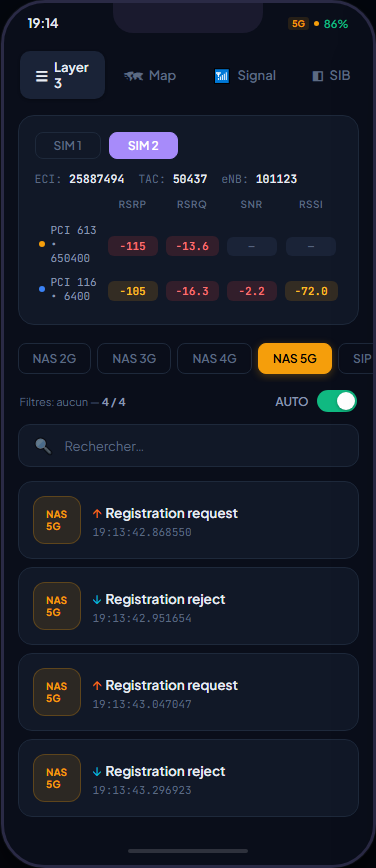
On the Layer 3 screen, you see at a glance:
- Real-time RF KPIs — RSRP −115 dBm (5G), −105 dBm (4G), color-coded
- Chronological NAS 5G signaling with direction indicators (UL ↑ / DL ↓)
- Protocol filtering — NAS 2G, 3G, 4G, 5G, and SIP tabs
Tapping the first message reveals the full decoded content:
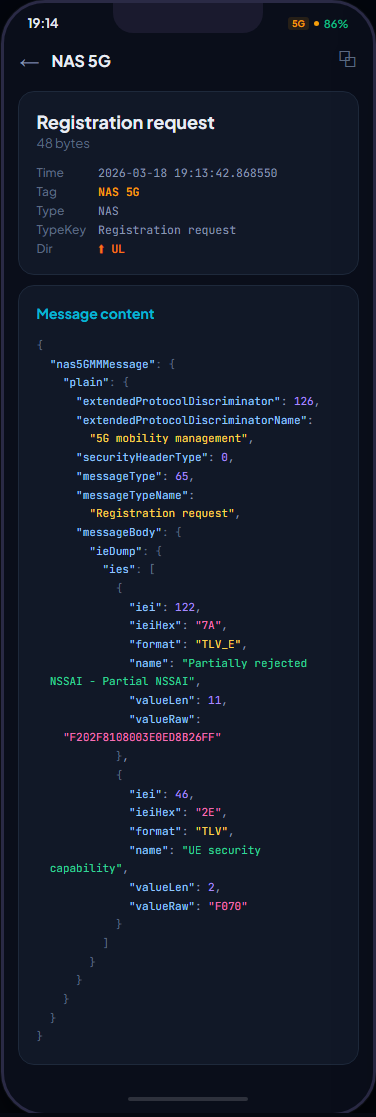
HiCellTek’s decoded output shows:
- Extended Protocol Discriminator: 126 → 5G Mobility Management
- Message Type: 65 → Registration Request
- IEs present: Partial NSSAI (rejected slice), UE Security Capability
- Every field decoded alongside its raw hex value
Step 2 — Registration Reject (DL)
19:13:42.951 — Just 83 milliseconds later, the AMF rejects the registration.
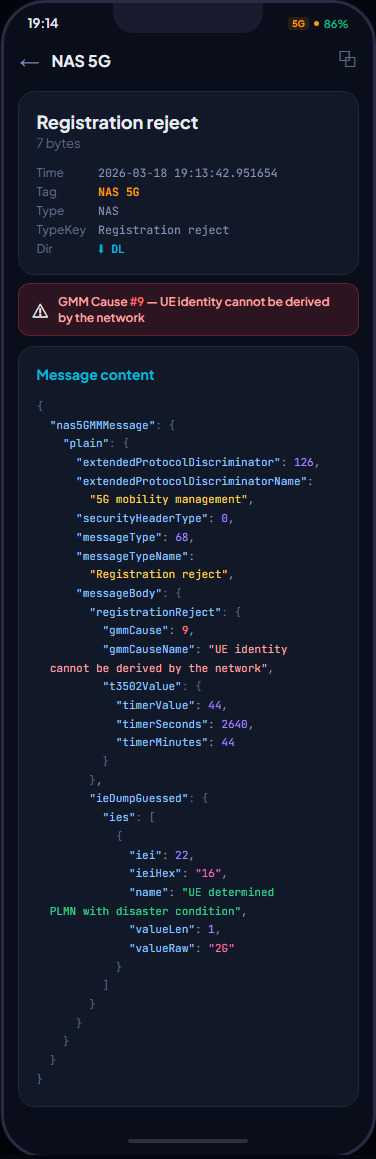
The red rejection banner immediately shows:
GMM Cause #9 — “UE identity cannot be derived by the network”
This means the 5G core (UDM/AUSF) could not resolve the device identity. The most common root causes:
- SIM not provisioned for 5G SA — the USIM profile has no 5G subscription in HSS/UDM
- Malformed SUCI or missing encryption key — the device can’t generate a valid 5G identity
- No 5G security context — first SA registration attempt without a valid 5G-GUTI, and the network can’t authenticate via SUPI
The decoded T3502 timer shows 44 minutes before the next automatic retry — 44 minutes of degraded service the user will never understand.
Step 3 — Retry loop… and silent fallback
| Time | Direction | Message | Result |
|---|---|---|---|
| 19:13:42.868 | ↑ UL | Registration Request | Sent to AMF |
| 19:13:42.951 | ↓ DL | Registration Reject | Cause #9 |
| 19:13:43.047 | ↑ UL | Registration Request | Retry |
| 19:13:43.296 | ↓ DL | Registration Reject | Cause #9 again |
The device loops, then silently falls back to 4G. The user sees nothing. The 5G icon may even remain displayed.
Why this matters for professionals
Without a tool like HiCellTek, diagnosing this issue requires either:
- Access to the core network — N1/N2 traces from the AMF side
- Or a network analysis tool like Keysight or Rohde & Schwarz, costing tens of thousands of euros
HiCellTek does it directly on the device, in the field, in real time.
A 5G integration engineer can immediately:
- ✅ Confirm whether a SIM is accepted on 5G SA or not
- ✅ Identify the exact cause of the rejection (GMM cause code in plain text)
- ✅ Distinguish between a SIM issue, a network issue, or a device issue
- ✅ Document the problem with a timestamped, exportable capture
No laptop. No post-processing. Just the phone.
On the main Layer 3 screen, the engineer sees at a glance:
- Real-time RF KPIs with color-coded thresholds (green / orange / red)
- Chronological message list of NAS 5G signaling with direction indicators
- One tap → full decoded message, IE by IE, with raw hex values
Everything runs on the phone. No laptop. No cables. No post-processing.
A French-built tool for network sovereignty
HiCellTek is developed in France by a telecom engineer with 15 years of field experience.
The tool covers protocol analysis from 2G to 5G — NAS, RRC, IMS/SIP — delivering the kind of visibility that only professional tools like TEMS or Nemo offered until now, but in a mobile, accessible, and sovereign package.
Operators, integrators, equipment vendors: if your field teams need real visibility into what’s happening between the device and the network — HiCellTek is built for you.
Founder of HiCellTek. 15+ years in telecom, operator side, vendor side, field side. Building the field tool RF engineers deserve.
Request a personalized demo of HiCellTek — 2G/3G/4G/5G network diagnostics on Android.